10 Reminders Every Team Should Send to Be More Productive
The exact recurring reminders that keep high-performing teams on track — not motivational fluff, but specific messages that prevent the bottlenecks, dropped balls, and slow weeks.
Most productivity advice focuses on individual habits — time blocking, inbox zero, the Pomodoro technique. It's useful, but it misses something: most of the friction that slows teams down isn't personal discipline, it's coordination overhead. Work that stalls because nobody remembered to update the ticket. Decisions that don't get made because the right people weren't in the loop. Blockers that sit for two days because nobody asked.
The right recurring reminders eliminate most of this friction before it happens. Here are 10 that actually move the needle — with the specific messages and scheduling logic behind each one.
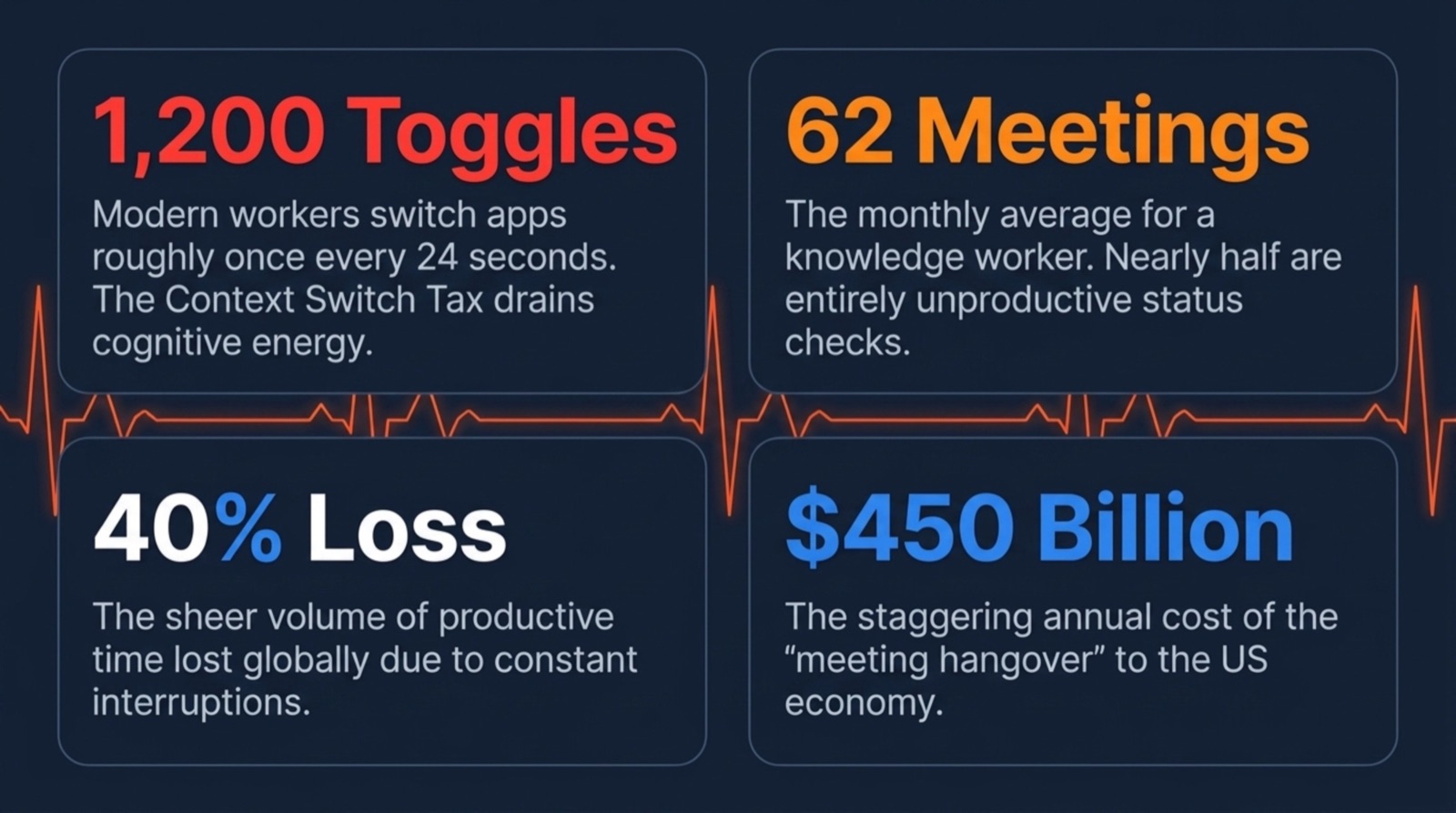
The cost of NOT having reminders: 1,200 app toggles, 62 meetings, and 40% of productive time lost to constant context switching. Reminders shrink that surface area.
1. The Monday morning kickoff
Monday morning is the highest-leverage moment in the work week. Teams that start it aligned — knowing the priorities, knowing who's doing what, knowing what might go wrong — ship more and waste less by Friday. Teams that drift into Monday without that alignment spend Tuesday having conversations they should have had Monday.
Nitesh scheduled this once · fires every Monday 8:45 AM
#team-general8 members
Nitesh Gargschedule message8:45 AM
Good morning! Kicking off the week 🚀
Drop in thread: • Your top 1–2 priorities this week • Anything you need from someone else to hit them • Any risks or unknowns on your radar
Let's make it a good one.
🚀6☀️4
Sarah Chen8:52 AM
Priority: ship the auth redesign by Thursday 🎯 Need: @Nitesh sign-off on the error state before I hand to eng. Risk: none yet.
✅3
James Park8:56 AM
Getting PR #241 merged. At risk: CI has been flaky — if it fails again I'll need a second reviewer to expedite. @Sarah can you review after auth?
Nitesh Garg9:00 AM
@Sarah error states are on my calendar for 10am — let's do it then. @James looping in @Marco as backup reviewer for CI fallback.
🙏4
Three questions, five minutes, the whole team aligned before the week kicks off.
When: Monday, 8:45 AM. Why it works: The three questions reveal dependencies before they become blockers. When someone says "I need a design review from @Alex before I can move forward on X," that gets resolved Monday morning instead of Thursday afternoon.
2. The mid-week momentum check
Wednesday is when week's momentum either holds or breaks. Work that was on track Monday can silently stall by Wednesday — ticket stuck in review, waiting on an external dependency, scope grew unexpectedly. A Wednesday check-in surfaces these before they become a Friday scramble.
Nitesh scheduled this once · fires every Wednesday 10:00 AM
#team-general8 members
Nitesh Gargschedule message10:00 AM
Mid-week check ⚡
How's the week going? Quick thread: • Still on track for your priorities? • Anything stuck or slipping? • Any decisions needed before Friday?
Rather know now than Friday.
⚡5
Sarah Chen10:06 AM
Auth redesign slipping by ~1 day — found a mobile edge case this morning. Still targeting Friday but flagging now. 🟡
James Park10:09 AM
All good. PR merged this morning, on to error boundaries. On track 🟢
🎉3
Carlos M10:13 AM
Stuck ⚠️ Pricing page copy waiting on legal approval since Monday. Without it the page doesn't go live. Need to escalate — @Nitesh can you nudge legal?
Carlos's pricing page was blocked since Monday. The reminder surfaces it Wednesday — still time to resolve before Friday.
When: Wednesday, 10:00 AM. The "rather know now than Friday" line is specific and it works — it reframes the question as risk management, not surveillance.
3. The Friday EOD wrap
The end-of-week wrap does two things: it creates a public record of what got shipped, and it closes the loop on the week before people check out for the weekend. Without it, Monday starts with nobody quite remembering where things were left.
Nitesh scheduled this once · fires every Friday 3:30 PM
#team-general8 members
Nitesh Gargschedule message3:30 PM
It's Friday — let's wrap the week! 🎉
Drop in thread: • Biggest thing you shipped or moved forward • Anything carrying over to next week • One person you want to give a shoutout to
Shipped: error boundaries + PR queue cleared. Carries over: tablet breakpoints (small). Shoutout: @Sarah for unblocking my design question at 6pm Tuesday 🙏
❤️5
Public record of wins, carries-over, and shoutouts — takes 2 minutes to write and sets up Monday for free.
When: Friday, 3:30 PM. The shoutout section consistently gets the most responses — people like recognizing teammates publicly. That's a feature, not a bug.
4. The ticket / task update reminder
Stale tickets are one of the most reliable indicators of a team in distress. When nobody's updating tasks, managers can't plan, PMs can't communicate status, and everyone loses confidence in the board. A simple "update your tickets" reminder — posted into the right channel before the sprint review — is unglamorous and incredibly effective.
Schedule Message · fires the day before every sprint review · 2:00 PM
#engineering7 members
Schedule Message2:00 PM
Sprint review prep reminder 📋
Before our review tomorrow, please: ✅ Close anything you've shipped 🔄 Update status on in-progress work ❌ Flag anything that won't make the sprint
An accurate board means a productive review. 10 minutes now saves 30 tomorrow.
📋5✅4
James Park2:09 PM
Done — closed 4, updated 3 in-progress, flagged ENG-441 as not shipping this sprint (DST bug needs more time) ✅
✅3
Marco D2:14 PM
All updated. Had 2 tickets marked In Progress that were actually done — board is clean now ✅
Sarah Chen2:19 PM
Updated. Added blocker reason on ENG-448 so the team has context in tomorrow's review 📝
👍4
10 minutes of updates, 30 minutes saved in tomorrow's review. An accurate board every single sprint.
When: Day before sprint review, 2:00 PM. The "10 minutes now saves 30 minutes tomorrow" framing is honest and usually accurate.
Set these reminders once — Schedule Message sends them automatically every sprint.
Teams move slowly when decisions are pending and nobody's tracking them. This reminder asks people to surface pending decisions at the start of the week — not to resolve them all, but to make sure they have an owner and a timeline.
Nitesh scheduled this once · fires every Monday 9:30 AM
#product-team5 members
Nitesh Gargschedule message9:30 AM
Decisions check-in 🗓️
Any decisions from last week that haven't been made yet? Any this week needs?
Format: Decision · Owner · By when
Decisions without an owner and a deadline don't get made.
🗓️4
Priya S9:36 AM
Pending: should mobile nav collapse at 768px or 1024px? Owner: @James. Need by Tuesday EOD for dev handoff.
Nitesh Garg9:39 AM
Pending from last week: do we rename 'recurring' to 'scheduled' in the UI? Owner: me. I'll decide by Wednesday after checking with @Sarah on user research.
👍3
Two pending decisions, both with owners and deadlines — surfaced in 3 minutes instead of sitting unresolved until Thursday.
When: Monday, 9:30 AM (after the kickoff message). Works especially well for product and leadership teams where decisions bottleneck a lot of work.
6. The dependency sweep
Cross-team dependencies are the most common source of invisible delay. Work stalls because Team A is waiting on Team B and neither is talking. A weekly dependency sweep forces this into the open before it becomes a three-day delay that lands in a retrospective with "we should communicate better."
Nitesh scheduled this once · fires every Monday 9:30 AM
#engineering7 members
Nitesh Gargschedule message9:30 AM
Weekly dependency check 🔗
Anyone waiting on something from outside the team this week?
Format: 'Waiting on [person/team] for [what], need it by [when]'
If you see someone waiting on you — reply and commit to a timeline.
🔗4
Marco D9:37 AM
Waiting on @James for review of the timezone PR (ENG-441). Need it by Wednesday EOD or the DST fix slips the release window.
James Park9:40 AM
On it @Marco — reviewing this afternoon, feedback by noon tomorrow latest. Didn't realize it was blocking the release.
🙏5
Marco's blocker was invisible until the sweep. James commits to a timeline on the spot — resolved Wednesday instead of Friday.
When: Monday or Tuesday, morning. The suggested format is key — vague "I'm blocked by design" doesn't create accountability; "I need the component spec from @Sarah by Wednesday EOD" does.
7. The on-call / rotation handoff
Rotation handoffs are one of those things that everyone agrees should happen and nobody does consistently unless there's a prompt. Without a structured handoff, the incoming engineer starts the week with no context on ongoing incidents, known issues, or things to watch. This reminder makes the handoff happen on schedule, every time.
Nitesh scheduled this once · fires every Monday at rotation change · 9:00 AM
#dev-oncall4 members
Nitesh Gargschedule message9:00 AM
On-call handoff — this week's rotation 🔔
Outgoing: please share in thread by 9:30 AM: • Any open or recent incidents • Known issues to watch • Escalation paths for anything active
Incoming — you're on from 9 AM today.
🔔3
Ravi M9:14 AM
Handing off 🤝 Open: ENG-441 DST issue, low severity, watch Sunday when clocks change. Known: auth service has elevated error rate 8–9AM daily, auto-recovers. Escalation: page @Nitesh for any P0.
🙏3
Sarah Chen9:19 AM
Got it, all clear ✅ @Ravi — for the DST window, should I proactively page someone or wait for user reports?
Structured handoff in 3 minutes. Incoming engineer starts the week with full context instead of discovering issues mid-incident.
When: Every rotation change day (Monday for weekly rotations), 9:00 AM.
8. The no-meeting day reminder
No-meeting days only work if people actually defend them. Without a reminder, the calendar slowly fills back up with "quick syncs" and "30-minute check-ins" until the protected day looks exactly like every other day. A recurring reminder is the social signal that the norm is being actively maintained.
Nitesh scheduled this once · fires every Wednesday 9:00 AM
#team-general8 members
Nitesh Gargschedule message9:00 AM
Reminder: today is no-meeting Wednesday 🧘
Protect your deep work time. If someone requests a meeting, feel free to move it to Thursday.
What are you using your uninterrupted time for? Drop in thread — good accountability.
🧘7💪5
Sarah Chen9:04 AM
Finishing the auth flow edge case review. Three hours uninterrupted does more than a normal day of fragmented work honestly.
💯4
Marco D9:07 AM
Architecture doc for the timezone refactor. Been deferring it for 2 weeks because meetings kept fragmenting my mornings.
James Park9:11 AM
Finally tackling the test coverage gap on billing. On my list since Sprint 38 😅
😂5
Public commitment to deep work creates accountability. Three people share what they're building — and they actually build it.
When: Your no-meeting day, 9:00 AM. The "what are you using your time for" prompt turns it from a passive reminder into active commitment — people who say what they're working on are more likely to actually do it.
9. The blocker escalation window
Most people wait too long to escalate a blocker. They don't want to look like they can't handle it, or they keep hoping it resolves itself. By the time they say something, a two-day blocker has become a five-day one. This reminder creates a specific, low-stakes moment to surface blockers before they compound.
Nitesh scheduled this once · fires every Thursday 11:00 AM
#engineering7 members
Nitesh Gargschedule message11:00 AM
Thursday blocker check 🚧
If you're stuck on anything — a response, a review, a decision — today is the day to escalate before the weekend.
What's been sitting longer than it should? Drop in thread.
🚧4
Marco D11:06 AM
Timezone PR hasn't had a review in 3 days ⚠️ If it doesn't merge by EOD tomorrow, the DST fix misses the release window and we're waiting another 2 weeks.
Nitesh Garg11:09 AM
@James@Sarah — who can own this review today? P1 path.
James Park11:11 AM
On it — reviewing now, feedback within 90 minutes 🔧
🙌6
Marco's PR sat 3 days without anyone knowing it was blocking a release. The Thursday prompt surfaces it — James reviews within 90 minutes.
When: Thursday, 11:00 AM. Thursday is the right day because there's still time to unblock before Friday, and because blockers that survive into the weekend tend to cost two or three days.
10. The 'what do we want to do differently?' monthly prompt
Individual retrospectives are valuable. Team-wide process retrospectives are rarer and higher-leverage. A monthly prompt asking the team what's slowing them down creates a lightweight continuous improvement loop without requiring a formal ceremony.
Nitesh scheduled this once · fires the last Friday of every month · 2:00 PM
#team-general8 members
Nitesh Gargschedule message2:00 PM
Monthly process check-in 🔄
One question: what's one thing about how we work that we should do differently next month?
Could be a process, a meeting, a tool, a habit. Anything that would make the team faster or less frustrated.
Drop in thread — everything's fair game.
🔄5💡4
Sarah Chen2:08 PM
PR review queue. 24+ hour waits kill momentum. Proposal: two designated review windows daily — 10am and 4pm — so reviews don't sit overnight.
💯7
Marco D2:13 PM
Linear hygiene. We decide things in Slack and forget to update the ticket. The board is always stale and planning suffers. Can we make ticket updates part of the standup format?
👍5
James Park2:18 PM
The 'emergency sync' that's become a recurring 3x/week thing. Half of them could be a Slack thread. Propose a simple 'is this actually urgent?' checklist before anyone books a same-day meeting.
🙌8
Three concrete process improvements surfaced in a thread — things that were only said in 1:1s until the prompt made it safe to say them publicly.
The right way to set these up
Don't try to run all 10 at once. Pick the three or four that address your team's most recurring pain points, set them up as recurring messages with Schedule Message, and run them for a full sprint cycle before adding more. The goal is a small set of messages that become expected rituals — not a channel full of bots that everyone ignores.
The setup for each takes about 90 seconds. Write the message, set the recurrence (weekly, every other Monday, last Friday of the month), and it runs from that point on — whether or not you're thinking about it.
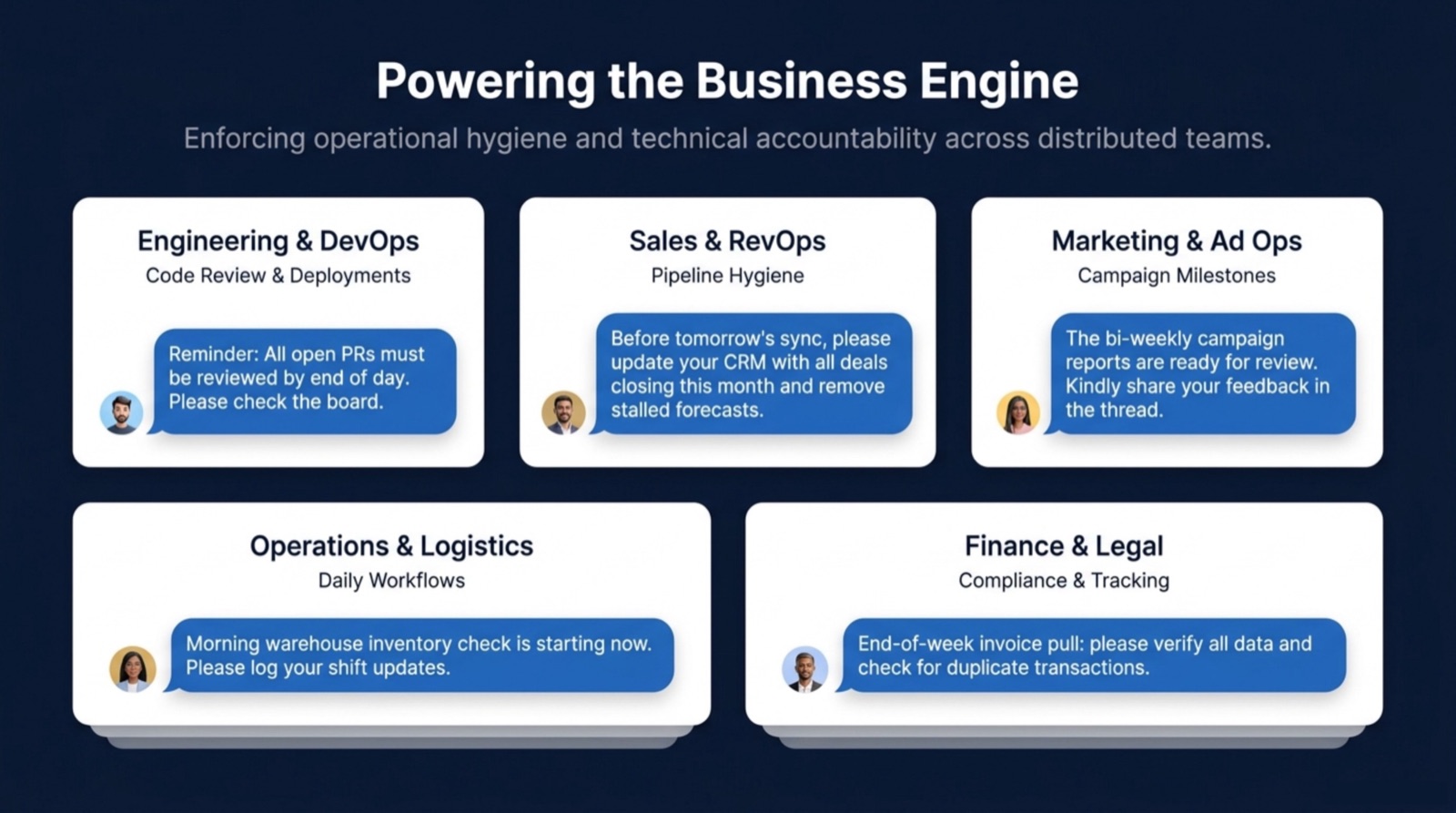
These reminders show up in every function — code review pings, CRM hygiene, campaign reports, warehouse checks, invoice pulls. Same automation pattern, different content.
Reminder
Day
Time
Frequency
Monday kickoff
Monday
8:45 AM
Weekly
Mid-week momentum check
Wednesday
10:00 AM
Weekly
Friday EOD wrap
Friday
3:30 PM
Weekly
Ticket / task update
Day before sprint review
2:00 PM
Every sprint
Decisions pending
Monday
9:30 AM
Weekly
Dependency sweep
Monday/Tuesday
9:30 AM
Weekly
On-call handoff
Rotation change day
9:00 AM
Every rotation
No-meeting day reminder
No-meeting day
9:00 AM
Weekly
Blocker escalation window
Thursday
11:00 AM
Weekly
Monthly process retro
Last Friday of month
2:00 PM
Monthly
Reminder schedule at a glance
What reminders actually improve team productivity?
The most impactful ones are those that prevent coordination failures: dependency sweeps (surfaces who's waiting on whom), blocker escalation windows (catches stuck work before it compounds), and decision trackers (prevents decisions from floating indefinitely). These address the root cause of most slow weeks — unclear dependencies and unresolved decisions.
How do I get my team to take Slack reminders seriously?
Three things: (1) respond to your own reminders first — if the manager ignores the kickoff message, so will everyone else; (2) act visibly on what people share — if someone flags a blocker and you help them in the thread, they flag the next one faster; (3) be selective — 2–3 reminders that matter beat 10 that become noise.
Should team reminders come from a person or a bot?
From a person. Messages that appear to come from a real teammate with a face and a name get more engagement than messages from a bot account. Tools like Schedule Message post recurring messages under your name and avatar, which is why they outperform dedicated standup bots on response rates.
How many recurring messages is too many?
Most teams can sustain 3–5 recurring messages before they start becoming background noise. If you're running more than that, audit them quarterly: which ones consistently get good responses? Those stay. Which ones get ignored? Cut or simplify them.
How do I automate these reminders in Slack?
Use Schedule Message. Install it in Slack or Google Chat, type /schedule in any channel, write the message, and set a recurrence. Takes about 90 seconds per message. Once set, it sends automatically on the schedule you define — weekly, every other Monday, last Friday of the month, etc.
Productive teams aren't ones where everyone is trying harder. They're ones where the infrastructure for coordination runs automatically — where nobody has to remember to ask "what's blocking you?" because the question gets asked at the same time every week, whether or not anyone thinks about it.
Set up your team reminders once. They send themselves from that point on.